Core Jumping and Timing
Pixel Jumper asks one thing of you: time each jump so your character lands safely on the next platform. Press the up arrow or tap the screen to leap, then watch for spikes, gaps, and moving platforms that shift position. Stars sit along the route, but grabbing them often means jumping closer to danger. The tension comes from choosing when to play safe and when to reach for a star.
Level Flow and Rising Difficulty
Each level introduces a new challenge, and the game gradually increases difficulty as you advance. Early stages give you room to learn the jump arc and platform timing; later stages compress that margin and demand faster reactions. There is no level select or upgrade system mentioned, so progress depends on clearing the current stage before moving on.
Visual Style and Atmosphere
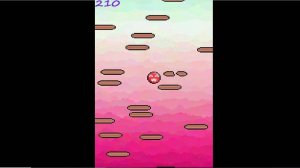
Bright pixel art and upbeat music define the mood. The retro graphics keep obstacles readable against the background, which matters when a spike or gap appears near a landing spot. The overall presentation is cheerful rather than tense, which fits the casual label and makes the game approachable for players of any age.
Playing in Short Sessions
Because Pixel Jumper runs in a browser with no download or installation, you can open it, play a few levels, and close the tab without setup. That makes it easy to fit into a coffee break or a longer sitting. The simple controls and forgiving early levels mean new players can start immediately, while the later difficulty curve gives returning players something to improve against.








Editorial Notes